How to Import a Schedule
Follow these steps to import your schedule using an Excel template. This is the most efficient way to set up complex rotations and employee assignments.
Step 1: Create the Schedule Container
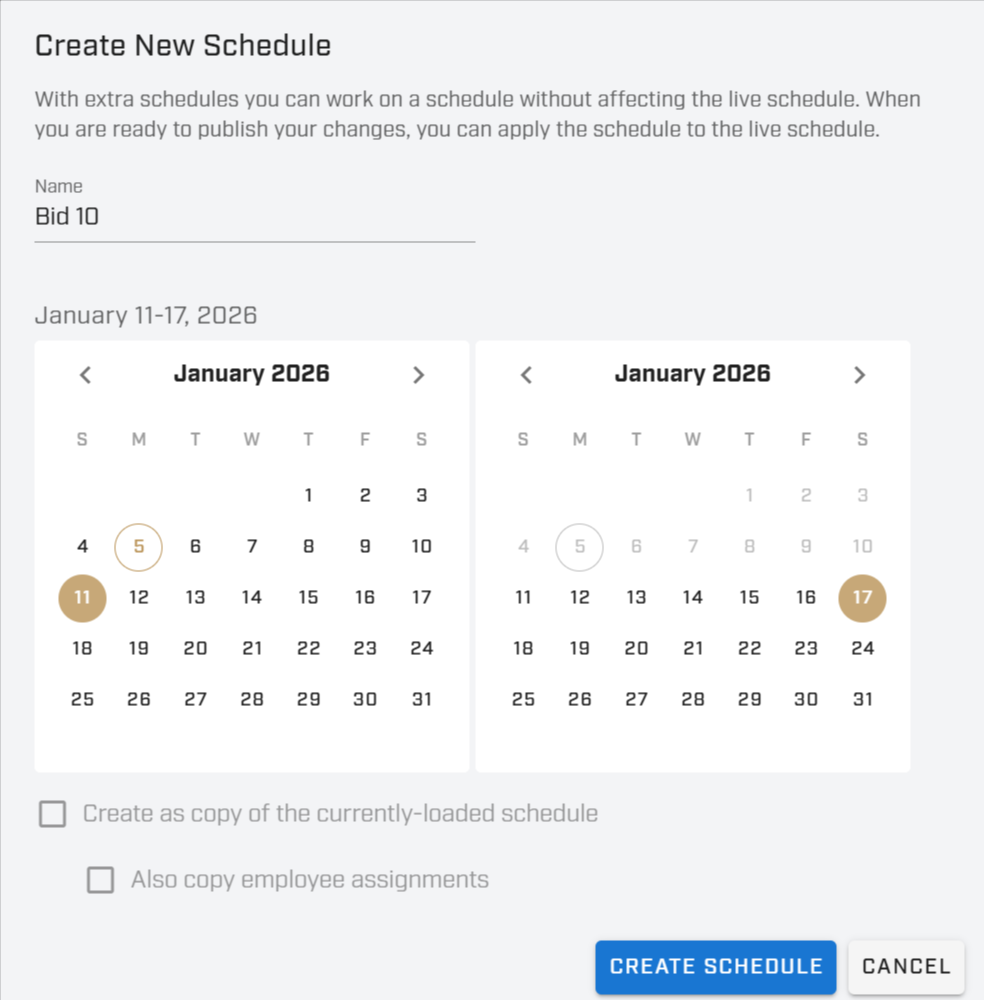
- Go to Menu > Set up Schedules.
- Under the Select Schedule dropdown, click on New Schedule.
- Enter the Name (e.g., "Bid 10") and select the Date Range.
- Click Create Schedule.
Step 2: Prepare Your Excel File
Download template: see attached file below
Important Requirements:
- File Format: The file must be an Excel (.xlsx) file.
- Groups: Any Group name can be used; it does not need to match existing groups in the system.
- Unique Shifts: Shift names must be unique. If a duplicate is found, the system will use the second item in order.
- Employees: Adding a name to the Employee column adds them to the schedule while keeping the Shift Slot Name.
- Note: If a name does not match an employee in the system, you will receive an error message.
- Rotation Length: To add more days to the pattern, simply add columns for Day 8, Day 9, etc.
Sample Formatting (7-Day Pattern)
| Group | Shift | Employee | Activity | Day 1 | Day 2 | Day 3 | Day 4 | Day 5 | Day 6 | Day 7 |
|---|---|---|---|---|---|---|---|---|---|---|
| Patrol A | A-01 | Patrol | 0700-1500 | 0700-1500 | 0700-1500 | 0700-1500 | 0700-1500 | X | X | |
| Patrol A | A-02 | Patrol | 0700-1500 | 0700-1500 | 0700-1500 | 0700-1500 | 0700-1500 | X | X | |
| Patrol A | A-03 | Patrol | X | X | 0700-1500 | 0700-1500 | 0700-1500 | 0700-1500 | 0700-1500 | |
| Dispatch | D-01 | Dispatch | 1500-2300 | 1500-2300 | X | X | 1500-2300 | 1500-2300 | 1500-2300 | |
| Dispatch | D-02 | Dispatch | 1500-2300 | 1500-2300 | X | X | 1500-2300 | 1500-2300 | 1500-2300 | |
| Dispatch | D-03 | Dispatch | X | X | 1500-2300 | 1500-2300 | 1500-2300 | 1500-2300 | 1500-2300 |
Step 3: Upload the File
- On the Save button, click the dropdown arrow.
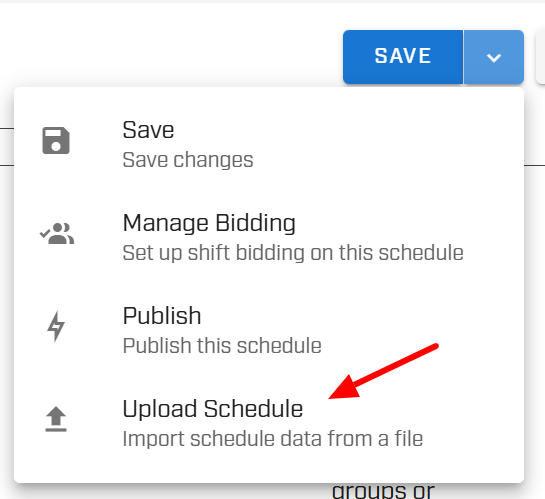
- Select Upload Schedule.
- Select your prepared Excel file and click Import.
Note: All existing data on the schedule will be overwritten upon import.
Was this article helpful?
That’s Great!
Thank you for your feedback
Sorry! We couldn't be helpful
Thank you for your feedback
Feedback sent
We appreciate your effort and will try to fix the article